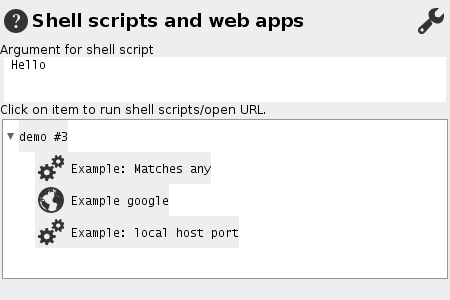
Executing shell command
This dialog allows to run programs on selected text or the current word under the mouse pointer.
All registered programs with a matching filter for the current text are displayed in an expandable tree. They can
be started by mouse click. For details, hold ctrl while clicking.
The list of shell-scripts is editable using the tool button at the top of the dialog.
Each line contains three tab-separated fields (Type Ctrl+I for ).
Example:
   demo\Example google	.*	http://www.google.com/search?q=*
   demo\Example: Matches starting with M	^M.*$	 echo starts with letter M *
Each line contains three fields separated by tab:
- The display name which may consist of several path components separated by slash.
- Optional a regular expression which. If the test matches the regular expression, the entry is displayed.
- An executable file or shell script or the URL of a web service. The asterisk is replaced by the current text.
For administrators:Alternatively, the program option "-customizeAddScriptByRegex" can be used to specify a file with shell-scripts.