Metannogen
Overview
Reconstruction of metabolic networks is the first step
in .
On one hand, Metannogen is a full featured
browser of reaction networks given in form of an
SBML file which allows manual annotation of reactions in a team of curators.
Metannogen is also a graphical work bench to stream line the
reconstruction of reaction networks in a team of curators or by a
single user.
It facilitates collection, organization, documentation and annotation of
biochemical reactions.
Being a Java program, it is ready to use without installation.
Different identifier systems:
The loaded networks might use different identifier systems for
metabolites. This problem is solved by dictionaries to translate
the identifiers. With the default Web-start link, the dictionary for
translating Palsson-group type identifiers into Kegg is loaded.
For example the dictionary contains the line "pyr
C00022" telling that the metabolite identifier "pyr" corresponds to the identifier "C00022".
Both denote Pyruvate. By explicitely mapping the metabolite
identifiers of Palsson-group and Kegg networks, the reactions
are indirectly assigned.
When users choose the
context menu item "Find reactions with same stoichiometry" on for example
Lactate-dehydrogenase (LDH), they would find two objects: The LDH
in Kegg and the LDH in the Palsson network.
Graphical pathway maps:
provides graphical Pathway views
which are used in Metannogen to map reactions and metabolites graphically.
The progress of reconstruction particular metabolic pathways can
be followed since those reaction boxes in the graphical pathway
maps are highlighted for which an equivalent reaction exists in
the network under reconstruction. Metabolite circles for which a
transport reaction is defined are also highlighted.
All objects in the graphical maps have a context menu and a .
They can be selected which is indicated by .
In addition KEGG provides image files of single
metabolites. They appear when the mouse is over a metabolite
name or metabolite identifier in a text-component of the
graphical user interface or when the mouse is over the
metabolite circle in the graphical pathway map.
Cross-references: Metannogen provides customizable
references to various databases to allow documentation of the
sources of evidence for the reaction under consideration. Some
cross-references are automatically generated. Others can be
entered during the network reconstruction to explain the
curator's opinions. Due to its many functions regarding
cross-references and browsing existing networks, it can be
conveniently used just as a browser for Kegg or other networks.
Publication management: Metannogen comes with a powerful
publication management system. It is based on semi-automated
association of publication full text files in PDF format with Pubmed IDs.
Downloaded full text files are shared by all curators.
Text expression higlighting and search includes the abstract text as well as the full text.
The publication management is also available in form of a smaller program package that starts much faster then Metannogen:
Webstart only publication manager.
Typing aids:
When writing annotation text in the multi line text field of datasets,
tab-word-completion is convenient and avoids mistyping of long words.
For example metabolite names are sometimes complicated.
Consider a long metabolite name such as
"UDP-N-acetylmuramoyl-L-alanyl-D-glutamate". It is hard to type
such complicated words without error. But with word expansion
one does only need to type the first few letters like "UDP-N-a"
and hit the tabulator key once or a few times until the desired
word appears.
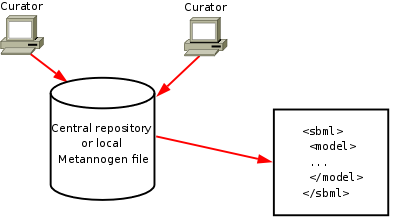
Single and multiuser mode: In single-user mode, the data is stored in a text file on the
client machine.
Metannogen is suitable for team work because it supports simultaneous
access of a central data storage.
Data export: The resulting network consisting of metabolites and reactions
can be exported as or any
user defined format such as SQL and
. The SBML-export allows further analysis such as or analysis
in programs like Copasy.
Metannogen is very flexible concerning adaptations of the output format towards special needs.
Requirements: One advantage of Metannogen over other solutions is that it does not
require advanced infrastructure:
Metannogen just needs a PC with Java with 200MBytes of free memory.
It has been tested on Linux, Windows-XP (SP2) and OpenSolaris. Occasionally, it is tested on MacOSX.
Availability: GNU-License. Open source. Metannogen is free of charge.
Getting started:
Now click the Web-start button in the navigation panel. In 80%
of cases the computer readily starts Metannogen. If it
does not start then go to the problems section below.
Please follow the main tutorial.
Starting Metannogen
Though there are many Java Runtime Environments (JRE) or
so-called Java Virtual Machines (Jvm)
available,
only the most widely used are appropriate for
Metannogen:
Java from
Sun, JRocket (Oracle), JRE of IBM, Openjdk and the Java
shipped with all Macintosh computers.
Visit the
Kegg web site.
Read the license of the Kegg database which is
loaded by Metannogen.
- If the web browser is correctly configured Metannogen can
be Web-started by clicking the
file metannogen.jnlp.
For this to work, the web browser needs to know that files with
the ending jnlp need to be processed with the application
.../javaws or on MS-Windows-platforms ...\javaws.exe.
The "Launch"-button in the navigation panel also points to
this jnlp file.
When Metannogen is configured for a certain project,
this jnlp file might need modification to set the required
command line parameters.
For testing in case of problems, the program javaws can be started directly from the
command line with the file metannogen.jnlp as argument.
The update mechanism of Javaws is not reliable.
To clear the Javaws cache, type in a terminal
javaws -uninstall
If Metannogen is still not started please visit
Is not starting.
Old versions Go to
Previous version /
Previous version >2010
to start an old version of metannogen.
- As a second and most robust way, the Java file metannogen.jar
can be downloaded and started from the command line.
The minimal program line is
java -Xmx200M -jar metannogen.jar
On 64-bit computers increase the memory to 400M.
In case your network environment requires a web proxy then the Web-proxy must be specified by an option
of the java command.
In our institution we specify the Web-proxy as follows:
java -Dhttp.proxyHost=realproxy.charite.de -Dhttp.proxyPort=888 -Dhttp.nonProxyHosts="www.charite.de|olli.charite.de" ...
Since customization of metannogen for the specific project may require several parameters (See manual for
details), a convenient way is to make a shell script. For standard computers (Linux,
Mac, Solaris) it may look like:
myWebProxy=-Dhttp.proxyHost=proxy.myInstitution.org
myData=/home/me/metannogenData
JAR=http://www.bioinformatics.org/strap/metannogen/metannogen.jar
curl -O $JAR -z metannogen.jar || wget -N $JAR
java $myWebProxy -Xmx200M -jar metannogen.jar \
-port=10117 \
-networks KEGG RECON1 EHMN \
-dictionaryOfSpecies myData/myFile.txt
For Windows PCs or other non-standard environments the script will need to be adapted.
The trailing back-slash characters allow to type the long command over several lines. The back-slashes are the last
character in the line. No white space must follow the trailing back-slashes.
Their meaning is to neutralize the line-end character.
Warning: At first start, downloading and unzipping of the
data may take a lot of time. Depending on the speed of the
internet connection, this may take up to half an hour.
It is
highly recommended that novices work up the
main tutorial.
Web-Proxy
If Metannogen starts and is able to download files from the internet you can skip this section.
If you do not know what a is please seek help by a colleague.
Metannogen needs access to the Internet.
In institutions with an Intranet all computers may access the Web via a proxy server.
If it is started by the proxy settings are usually imported from the browser.
A different proxy can be specified with the Java=control panel.
If Metannogen is started without Web-Start then the proxy is specified with command line options.
More details can be obtained by pressing "Test proxy settings" in the Running Metannogen.
Deinstallation of Metannogen
Metannogen does not alter system files nor changes the registry of MS-Windows.
At first start the files of the Kegg-Ligand database are downloaded to hard disk.
All files are stored in $HOME/.StrapAlign.
Because MS-Windows may exhibit problems with the dot is omitted.
If the home directory path contains white space (On old
Microsoft systems), a directory is created in the root of the
file system such as C:\metannogen\ or in C:\TEMP\.
Documentation
The documentation is available from the Help-menu in the running application.
An online version of the documentation can be viewed here:
Manual
Tutorials:
- The
Main Tutorial explains how Metannogen is used in a multiuser environment using a
demo database. To run this tutorial, Metannogen must be started.
When the starting dialog appears, the demo dataset store must be selected.
- The Export to SBML tutorial explains
how the metabolic network is generated from the datasets and exported in form of an SBML file.
It shows how the manually curated data is combined with other information: (I) Metabolite hash-tables and (II) files containing additional reaction attributes.
Umgehung von VPN
Verschiedene Tabellen werden von http://olli.charite.de geladen.
Das erfordert ausserhalb der Charite VPN.
Wenn man VPN umgehen möchte, kann man Hepatonet einmalig innerhalb der Charite starten und die die Dateien
~/.StrapAlign/web/olli.charite.de/ (oder
C:\StrapAlign\web/olli.charite.de\ ) übertragen.
Erzeugen des Hepatonet-Netzwerkes aus den Datensätzen
Andreas Hoppe
Zentrales PDF Verzeichnes
Pubmed-links mit assoziertem
PDF-Volltext erscheinen rot. Allerdings erstmal nur
diejenigen, die der Nutzer selbst assozierirt hat.
Um unser zentrales PDF repository zu Nutzen, muss man olli
mounten. Auf UNIX muss es auf das directory /nfs/sysbio
gemountet werden.
Features of Metannogen
GUI
- Customizable input forms
- Pubmed based literature management including association of full text PDF files.
- Automated download of Uniprot and Pubmed documents.
- Importing of other networks. Usage as template for new reactions.
- Cross references for datasets and named paragraphs.
- for browsable trees, graphical pathway views and IDs in text views.
Besides from these specific context menus the words in text components have a general context menu which allow highlighting and
running shell scripts.
Text views
- Spell-check with an extended dictionary.
- Keyword highlighting.
- Customizable .
- for metabolite and reaction names and common English words.
- For IDs of reactions, pathways, metabolites, Pubmed-abstracts, EC-Classes and datasets under the mouse pointer:
Data Management/Export
- Customizable export as , and CSV.
- Customizable non standard reaction and metabolite attributes for the export.
- Interface to libSBML.
- Backup for each session with time stamp. Logging all dataset uploads on the server.
Analysis
- Identification of dead-end metabolites.
- Identification of contradicting datasets.
Kegg Pathway maps
- Clickable reactions and metabolites
-
- Highlighting of focused datasets and reactions by
- Visualization of numeric data like mRNA expression levels
Customization
- Cellular compartments
- Native infrastructure: Web-browser, file-editor, file-viewer, file-browser
- Dictionaries for equivalent species and compartments.
- Input forms, Dataset validation
- Export formats
Data model of Metannogen
The data entered by curators are stored in datasets.
Datasets contain expert opinion in form of structured information as well as
free text.
Each dataset is saved as one single plain text line with tab
separated text fields. In multi-user mode, each
dataset is stored in its own file on the server.
The file name is the dataset ID.
In single-user mode all
dataset lines are stored in one single text file on the user's hard-disk.
Usually each dataset describes one biochemical conversion in one or several subcellular compartments.
Some enzymes and transport carriers are unspecific. To avoid
redundancy and to reduce typing,
the
syntax can be used. Brace expansion provides a compact form for expressing several different but similar
biochemical conversions within one single dataset.
Metannogen is an
program where all objects are kept in the main memory.
This is an advantage with respect to data safety,
performance and scriptability.
The disadvantage of Metannogen's
OO-design is that
performance problems would arise with network exceeding a
critical size limit. With modern (year 2010) PCs, this limit is about 10 times the
size of the Human Metabolice Network (Palsson et. al.);
In earlier days days the RAM was not yet sufficient to hold entire
networks in the main memory.
Therefore metabolic data management systems followed the
client server architecture where the data is stored in a
backend.
The disadvantage of a
relational database
approach is, that due to the complexity it is much more liable
to data loss as a consequence of programming errors.
Further, the slow data access is only compatible with user
interfaces that are relatively rigid and less flexible.
In Metannogen biochemical reactions and transporters are
instances of the class.
The objects hold references to
substrates and products which are instances of the
class.
The object model is very similar to libSBML.
This object model allows customization of output scripts.
A metabolic network is an instance of
. It is basically a list of
objects plus some additional
information.
The generation of the objects structure for the network may
be modulated by optional command line options such as
-dictionaryOfSpecies.
Attributes for reactions:
Generally, the comment field is for free text. Nevertheless,
information, that is written as variable declarations is
captured by the system.
The value of the variables can be obtained
with getAttribute-methods from the
objects.
The main purpose of these attributes is to provide the
possibility for the curators to enter information in a
structured standardized form such that this information can be included
in the exported file of the model (SBML, SQL).
Role of included databases
Kegg, and any network file in SBML format can be loaded in Metannogen
to serve as a reference and a template for datasets entered into
the system.
These imported networks are not directly part of the reaction
model under construction. They are rather a repository of
information for the curator.
Nevertheless, these networks provide human readable names
for metabolites and reactions and EC-Classes.
Using the Web-Start link the Edinburgh human
metabolic network and Palsson human network Recon1 are loaded.
Setting up a central data store
When several people work on the same project, the data can be kept on a Web-server.
There are two options:
- A user can register a project on the www.bioinformatics.org server.
The respective button appears in the start dialog of
Metannogen. The server will return a password. The user needs to write down the passwrod because
it is required to change data or to delete the project.
-
Advanced system administrators can create a repository on their own server.
This is explained in a tutorial.
But this option will not be relevant to most users.
Each dataset is stored in one short text file on the server
Demo_datasets/.
The file names are the dataset ID.
The central data store is managed by a PERL script
metannogen.pl.
The Perl script is called in two different ways:
- If called without parameters, it delivers all datasets as one single text.
- If called with the variable "datasets=...text...", the given datasets are written to the server.
The address of the Perl script of the demo database is
metannogenDemo.pl
This simple approach is extremely fast and robust. Transfer of a
database of 3000 biochemical reactions from the data store to
the client takes about a second.
It was also under consideration to store the data in a
relational database like Postgres.
However, current SQL database back-ends are still too slow too
for the functionality and high responsiveness of Metannogen.
See the comprehensive
benchmark tests for
SQLite, Postgres and MySQL.
In a multiuser environment it must be prevented that
changes by one user are overridden by another user. Therefore
the server response ends with a line "#CURRENTTIME=number"
where number is an integer value representing the universal time
on the server in seconds or milliseconds. Further it is
important, that the program Metannogen is accessing the server
directly and not through a
because only direct contacts return the correct
"last-modified" time for in the http-header.
Controlling the running Metannogen instance by Web links or external Programs
Interprocess communication with another application requires that the
other application can talk to Metannogen and optionally that it can launch Metannogen and that
Metannogen can talk to the other application.
If Metannogen is started with the option "-port=
portnumber" then it may work as a client of
Web pages and application.
The underlying mechanism is that it is listening to the port10117 for incomming commands.
For demonstration, you can try the following shell commands.
echo listObjects=R00014 | telnet localhost 10117
or
echo metaboliteStructure=C05125 | telnet localhost 10117
or
echo openDataset=R00014 | telnet localhost 10117
MS-Windows When I tested this telnet method under Windows-XP SP2 I found that the telnet command does not work properly.
It allows to enter the command like "listObjects=R00014" manually over the keyboard. But it does not allow piping text from the echo command.
Conclusion: This mechanism seems not to use with Windows-XP
at least with my Windows-XP machine.
Here are Emacs functions using telnet to open datasets from Emacs:
Emacs:The following Emacs-Lisp lines define three commands for Emacs to open a dataset, to view a metabolite structure and to
open an object in a browsable tree. The commands act on the token under the cursor:
(defun word-under-cursor(&optional delimL delimR)
"The word under the cursor"
(interactive)
(if (search-backward-regexp (or delimL "[^A-Za-z0-9_]") nil t) (forward-char) (beginning-of-buffer))
(setq word-under-cursor-begin (point))
(if (search-forward-regexp (or delimR "[^A-Za-z0-9_]") nil t) (backward-char) (end-of-buffer))
(setq word-under-cursor-end (point))
(buffer-substring word-under-cursor-begin word-under-cursor-end )
)
(defun MetannogenDataset()
(interactive)
(shell-command (concat "echo 'openDataset=" (word-under-cursor) "' | telnet localhost 10117 "))
)
(defun MetannogenMetaboliteStructure()
(interactive)
(shell-command (concat "echo 'metaboliteStructure=" (word-under-cursor "[ \r\t\n]" "[ \r\t\n]" ) "' | telnet localhost 10117 "))
)
(defun MetannogenList()
(interactive)
(shell-command (concat "echo 'listObjects=" (word-under-cursor "[ \r\t\n]" "[ \r\t\n]" ) "' | telnet localhost 10117 "))
)
Above telnet method is very primitive and does not provide all required functions.
One may need to
- Programmatically define which networks are loaded.
- Programmatically provide the location and password of the
annotations repository.
- Start a Metannogen session if and only if it is not already started.
- Accept requests from Metannogen.
Full featured communication is described for two cases:
- Communication with a Web Service Web service.
- Communication with an program application Program application.
Application programming interface (API)
Metannogen provides a simple and powerful
to access the network data
programmatically. This API is used to customize the output
formats and to modify the Dataset input mask.
Users only need to access four classes:
- : contains the reactants and products and their stoichiometries and subcellular localization.
- : contains arrays of Reaction objects.
- : contains the name and attributes of reactants or products.
- : contains the Networks in form of ReactionCollection-objects.
This is very simple
and should be usable even for users who are not Java
programmers. Metannogen provides the required infrastructure:
The Java and an Editor
with .
Code changes take effect immediately and
restarting of Metannogen is not necessary (See Hotswap).
Users who prefere to use libSBML instead of this API,
need to install libSBML manually. It cannot be installed by
Metannogen automatically, because it has
as
explained in the libSBML-Export script.
Related projects
- MetaCyc
- aMAZE LightBench
- Reactome
- JUICE:
- Sycamore:
- Meta-All
- Utilities for viewing Large text files
Bugs and Limitations
The object tree is sometimes not drawn.
Workaround: press the redraw button
Bug reports and suggestions to christoph.gille

charite.de